Skip to content

Guide to Uploading Accounting
Documents to Google Drive

To support the preparation and submission of the Financial Year End (FYE) statements, we kindly ask for your assistance in providing and uploading your monthly accounting documents via the provided Google Drive link.

Prepared by VietCham Singapore · Updated 29 July 2026
Purpose & Procedure

To support the preparation and submission of the Financial Year End (FYE) statements, we kindly request our clients to assist in providing and uploading additional monthly documents via the provided Drive link. Please follow the 2 steps below to prepare and organize documents accurately.

01

Choose the Current FYE Folder

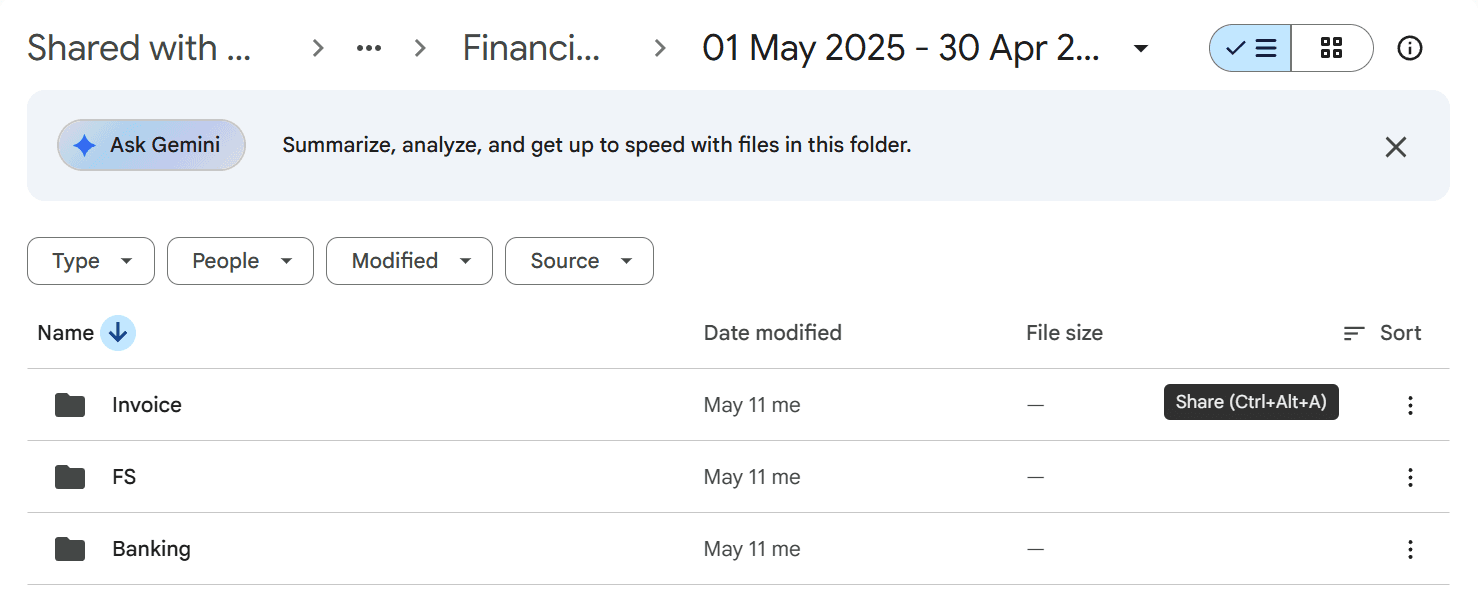
When accessing the Google Drive link provided by VietCham for your enterprise, you will see a list of folders corresponding to each Financial Year End (FYE). Please double-click to access the correct folder for the current period.

Access provided Drive link
Select the correct FYE
Choose the current financial year end folder in Google Drive
Illustration Step 1: Client selects the current financial reporting period
02

Categorize Documents into Folders

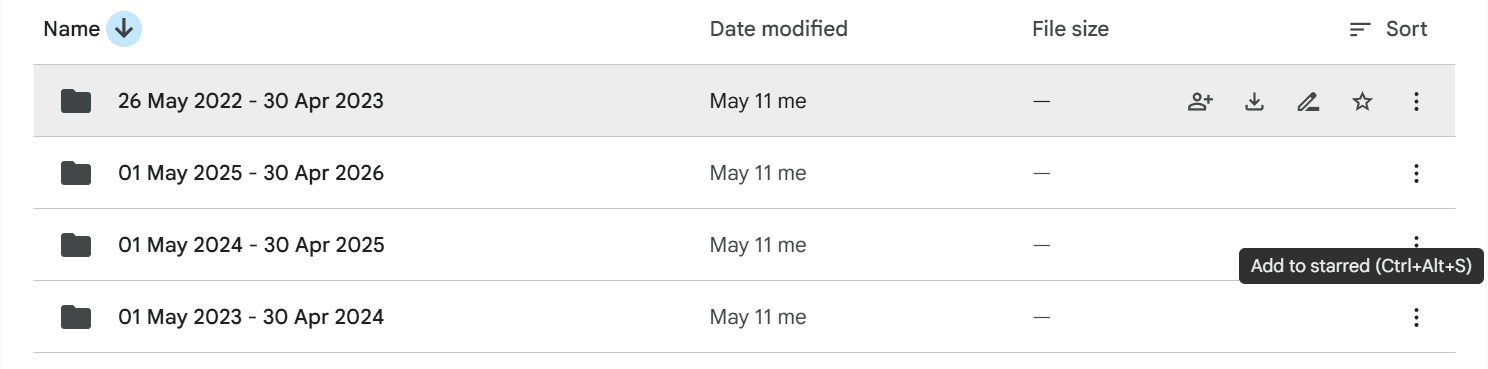
When uploading, please ensure documents are categorized into the correct folders as follows:

1Banking / Statement

Upload account statements for the banks your business uses (e.g., WISE, OCBC, DBS, UOB, Airwallex, Aspire).

Structure: Banking/Statement/[Bank Name]

Format: Original monthly statement PDF from bank app/website.

2Invoice

Categorize invoices into 2 sub-folders:

📁 Inward

Purchase/service invoices (operating expenses, suppliers).

📁 Outward

Sales/service invoices (issued to customers, revenue).

3FS (Financial Statements)

Upload files related to Financial Statements (previous reports, opening balances, audit documents, or related notes).

Standard Folder Structure

📁 Banking / Statement / [Bank Name]Upload account statements for banks (WISE, OCBC, DBS, Airwallex, Aspire,...)
📁 Invoice
├── 📁 Inward: Purchase/service invoices
└── 📁 Outward: Sales/service invoices
📁 FSUpload files related to Financial Statements
Categorize into correct folders
Clear PDF / Scan files
Absolute data security
Categorize documents into correct folders (Banking, Invoice, FS)
Illustration Step 2: Categorize documents into correct folders

Important notes when uploading documents:

  • Monthly upload: Please provide and upload documents monthly as soon as they arise. This helps VietCham's accounting team to reconcile continuously, process data timely, and avoid backlogs and delays in FYE preparation.
  • Complete & Clear: Bank statements need to include all months in the reporting period. Invoices must clearly show supplier/customer name, date, currency, and payment amount.
  • Clear file naming: Name files according to the standard (e.g., YYYY-MM-DD_DocumentName.pdf) for easy categorization and quick reconciliation.
Warning for Late Filing Penalty (ACRA Singapore):

The Accounting and Corporate Regulatory Authority (ACRA) Singapore applies a Late Lodgement Penalty framework that increases over time for late filing of Financial Statements & Annual Return (AR). Providing documents on time monthly helps your business fulfill compliance obligations on time and avoid unnecessary administrative fines.

Need support with Accounting & FS?

VietCham Singapore's team of financial and accounting experts is ready to answer questions and help complete financial statements in compliance with regulations.

1800 64 68 03
contact@vietcham.org.sg
18 Sin Ming Lane, #07-13, Midview City, Singapore 573960
Contact Us
Consult VietCham